
Longacre Deployment Management (LDM ) is an enterprise-level CM technique that provides robust, accurate CM functions in broadly diverse development environments. LDM solves many of the problems associated with database systems; and with organizations composed of teams using different technologies, in different places, or formed from different organizations. It is an existing technique-LDM has already been deployed in a complex development environment. This article is not a case study: it provides the technical details of the LDM technique. If you are not a CM specialist, your eyes are going to glaze over.
Motivation
LDM was developed to address a real need. A recent customer had glaring CM problems in an enterprise that involved many different development technologies (Cobol/iSeries, Java/Linux, .NET/Windows) including a database-intensive 4GL built on an Oracle/Java/Windows development platform. The development environment included different teams, with different management chains. The development teams were spread across several geographically distributed locations. The problems and some solutions are described in an accompanying article, "Case Study: Enterprise and Database CM," by Austin Hastings and Ray Mellott.
An experienced IT manager recognized the problems as being CM problems, and called for help on the CM Crossroads web site. That call for help strongly resonated with this explanation of the underlying mission of software CM, by Wayne Babich:
On any team project, a certain degree of confusion is inevitable. The goal is to minimize this confusion so that more work can get done. The art of coordinating software development to minimize this particular type of confusion is called configuration management. Configuration management is the art of identifying, organizing, and controlling modifications to the software being built by a programming team. The goal is to maximize productivity by minimizing mistakes.
LDM is another way to coordinate software development. Its strengths are support for development of database components, and a high level of abstraction that permits different technologies, different teams, and different geographic locations to be part of the same development effort. According to IEEE Std. 610,
Configuration Management is a discipline applying technical and administrative direction and surveillance to identify and document the functional and physical characteristics of a configuration item, control changes to those characteristics, record and report change processing and implementation status, and verify compliance with specified requirements.
LDM supports or enables all of these elements of CM.
Overview
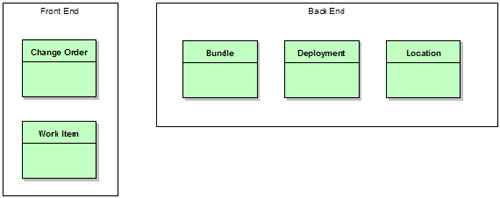
LDM divides into two parts. The front end consists of traditional change tracking entities. The back end is non-traditional, and will need more detailed explanation. Development of the LDM technique was enabled and influenced by the flexible issue work flow definition tools provided by modern issue tracking systems, and by the ITIL Service Desk model.
Many standard CM operations are taken completely for granted-LDM requires a modern CM tool as its implementation platform. Our implementation was built on MKS's Integrity 2006 system, with WebSphere, MKS Implementer, Microsoft's .NET development suite, and a host of other development tools.
Front End
The front end of the process includes a basic implementation of the Task-Level Commit pattern implemented using fine-grained Work Items (tasks) to track specific changes and larger Change Order entities for the usual CM "heavy lifting." The labels Change Order and Work Item are chosen by analogy with the traditional business entities Purchase Order and Line Item. The front end entities in LDM are those most commonly used by developers, and so they are deliberately very common: aside from the simplified life cycle, detailed later, there should be few surprises in the front end for anyone accustomed to a modern CM solution.
Change orders are enterprise-specific. They store the detailed description, test case links, test results, sign-offs, approvals, defect and impact classification, root cause analysis, and whatever other data your group or company associates with changes. A change order is just exactly what you think it is: a ticket in your change tracking system. Change orders are broken down into individual work items by the development team.
Each work item represents a logically related set of changes, usually made by a single developer. These are tight, coherent sets of changes. A work item may be created for a single change to a single value, if that is all that is required to effect the required change. Work items collect very little data during their life cycle-mainly the developer's id and the start and end time stamps. Instead, they link together the set of changes made by the developer. Work items may be implemented using the task or change set feature of your CM tool, but in many cases these built-in entities won't work and a separate issue type must be created.
A change order may be broken into work items in two different ways. First, the work items may be parallel sub-tasks of the order, each one independent of the others. Second, the work items may be sequential updates to the same area: the first item contains a bug, so a second item is created, etc. Both of these approaches work, and work items can be allocated in either fashion (or both) within a single change order.
Nearly every change control implementation includes a looping lifecycle: some mechanism whereby a change can be tested, failed, and sent back for rework. In our LDM implementation, that loop is in the change order lifecycle. All work items are one-way, no-going-back entities. When a work item fails to deliver what is required, the change order containing that work item loops, if necessary, and another work item is created.
This "accumulation" of change is a crucial part of the technical implementation. Making each work item an atomic, irreversible entity enables LDM to support database development, and significantly simplifies geographically distributed development.
If a change order has one work item already delivered to test and a second work item in development (a bug fix, or a separate sub-task), the "status" of that change order may be unclear. Is it "in development" or "partially ready for testing?" This is an implementation issue: your team's culture will decide whether status is given optimistically or pessimistically. While this uncertainty is okay for a change order, the status of the individual work items must never be unclear. Work items are either done, or not done. The question of whether a particular work item has been deployed to a particular target location is answered using back end objects.
LDM depends on having the "uncertainty" concentrated in the change orders. All of the back end objects link to the work items, not the change orders. Concentrating the uncertainty into the change order type allows the rest of the LDM model to be extensively automated.
Back End
The LDM back end is significantly different from a traditional CM solution. This part of LDM derives from the ITIL configuration tracking model, and connects the work items (not the change orders) to discrete locations where the changes represented by the work items have been deployed. The connection uses Bundle, Deployment, and Location entities to establish an accurate picture of the configuration of each location.
Supporting database development is the sine qua non of LDM. There are traditional CM techniques that can support geographically distributed development, and some can be abstracted to support disparate development technologies. But managing changes to the structure and content of a relational database was the key issue when LDM was developed, and so database CM became the one essential feature. The simplest analogy is that traditional CM tries to control a database by treating it as a file, or a product derived from a set of files. LDM takes the opposite approach, and controls software configurations by treating them as databases. This may help explain why the normal vocabulary of "builds" and "releases" is missing. It has been replaced with collecting together (bundling) small changes, and applying those changes (deploying) to a particular target (location).
Work items are grouped together into Bundles. A bundle is an entity that records basic information about the purpose and origination of the bundle, and links to the work items that compose the bundle. Extracting each work item's associated changes from a repository and grouping them into a deliverable package is called bundling. A bundle is considered to be atomic-all the changes in the bundle must be applied as a unit, or none of the changes should be present. This is akin to a transaction in relational database vernacular. The tools that support task- or change set-based development generally support applying and removing these changes atomically, but at the level of individual work items. You will have to build on top of this to extend atomicity to the bundle level.
When one or more mutually compatible bundles are ready, they can be deployed. A Deployment, another entity,ties bundles to the Locations where they are present. The deployment records contain documentary data, traceability data, and links to the contents and the deployment target locations.
Locations are the end target of Longacre Deployment Management. A location corresponds to a server, or a database, or a workspace. Whatever mechanism you use to discriminate among different deployment targets, that is a location. Typically, a location will be a separate machine, or a separate workspace, or a separate database instance. Locations are data records that replace some of the metadata usually associated with status tracking in traditional CM techniques. Instead of creating a different status for each test server (functional test vs. regression test), LDM creates location records for each server, and connects the work items to the location records using bundles and deployment records. A location record is just a proxy for a server-a piece of equipment-so the lifecycle is centered around tracking the service life of the equipment.
Because the work item records identify the actual changes made to the system by developers, these are the records that are linked to the bundles. A bundle will be linked to all of the work items that are packaged together by that bundle. A bundle can contain changes (links to work items) that are part of different change orders. Bundles are independent of change orders. The connections between change orders and work items are unrelated to the connections between bundles and work items.
Think of a truck from a building supply store delivering to a construction site: the truck may deliver items for plumbing and items for electrical work. The truck probably doesn't contain all the plumbing items, and it probably doesn't contain all the electrical items-the plumbers or the electricians may call up later and request more stuff. But it can contain items from both categories. In the same way, a bundle can contain finished parts of more than one change order. And it doesn't have to contain all of the parts of any change order. Just whatever changes have been scheduled for delivery that day.
The LDM back end is a different approach to software deployment than traditional CM techniques. "Bundle and deploy" is not the same as "build and release." Traditional CM focuses on configurations, and leaves updates to the configuration as a technical detail. LDM treats the updates as discrete objects and de-emphasizes the configurations themselves.
In traditional CM, the change order life cycle is a superset of the list of possible locations: a change order would move from (for example) the development state to the functional test state to the regression test state to the production state. LDM replaces this lifecycle metadata with simple data-location records. Rather than have states named after all the servers, or servers named after the states, LDM separates the change order work flow as seen by management from the deployment process used by build and release management. The work flow is simplified: a change order can be in development, or it can be in testing, or it can be finished.
At the same time, the individual work items that make up that change can be deployed to the development server, or the production server, or both in any combination. In the implementation, teams had either two servers or four servers, depending on what technology (Cobol, Java) they were developing. Neither two servers nor four servers correspond particularly well with the three parts of the simplified life cycle (development, test, production). But LDM glosses over exactly what servers correspond with what life cycle states: there is obviously a correspondence, but not a rigid equivalence. Instead, things that are being tested get marked as being in the "testing" part of their life cycle. And things that are deployed to the production server environment get bundled and linked with a deployment record indicating production deployment. If an urgent change happens to be tested in the production environment, that fact gets accurately reported.
LDM enables geographically, or technologically, or organizationally diverse teams to cooperate by providing a very simplistic change order life cycle and abstracting the lowest level CM details. A Cobol team on the top floor can cooperate with a documentation group in the basement and with Java teams in other parts of the world. What is needed is an abstract transport system to make all locations accessible, and a single repository for the LDM tracking objects (including the change orders and work items, or at least proxy objects for the work items).
Benefits
Probably the most important benefit is that LDM is an enterprise CM technique. The complex development models that are becoming commonplace in today's multi-technology, multi-location IT shops put a significant strain on conventional build-and-baseline CM approaches. LDM abstracts the CM operations and process model at a level that is comfortable for both managers managers and engineers trying to enable and manage development in a complex enterprise.
Further, LDM helps to address one of the most difficult challenges in software CM: controlling database structure and content. Conventional attempts to manage databases focus on representing the database as a file or file-derived artifact, to be controlled in the same fashion as ordinary source code. LDM treats server configurations, including traditional software work areas, as though they are databases, and builds a CM solution on this abstraction. Rather than trying to select a particular version of a database, or table, LDM tracks the updates that have been applied. It is much easier to implement a pseudo-SQL ‘UPDATE filename.c SET version = "2.1"' for files than it is to perform any kind of version compare on even a medium-sized database.
In fact, the initial implementation of LDM controlled database structure and content, plus traditional components that were developed and deployed on several different platforms and technologies: Cobol, PL/SQL, Java/WSAD and .NET running on iSeries, Linux, and Windows. The high level of abstraction lets a single unified work flow control development across the board, because the gritty details of software development are encapsulated in the change, bundle, and deploy model.
LDM also supports multiple, diverse teams. Because LDM is disconnected from the particular details of development, build, test, and release for a team, it can support different teams working separately or together. LDM moves management of the flow of changes to a higher level. This permits different teams using different work flows to use the same underlying investment in tools and scripting. It also lets separate teams quickly agree on a shared high-level work flow without the need to radically change the teams' internal development processes.
Teams that share a common LDM foundation can combine and divide again with very little stress. LDM enables organizations to treat their development teams and sub-teams as building blocks, so as to quickly react, at the organizational level, to development challenges.
Finally, LDM works regardless of geographic location. While the system assumes a single repository for storing workflow objects like bundles, change orders, etc., it also assumes that the key question in the CM process regards the location of changes. In a geographically diverse development environment, LDM requires that the abstract deployment method be capable of operating across the network, and requires that the Location records be capable of explicitly identifying a location. Beyond those requirements, LDM handles geographic complexity just as well as technological or organizational complexity.
Drawbacks & Constraints
LDM requires the abstraction of the basic CM and build operations. There is no way to implement LDM without a solid understanding of the individual steps in the software change flow, or without the ability to script those changes. A scripting or automation specialist is essential.
There is an absolute technical minimum: LDM requires tightly integrated tools. If you cannot or will not provide this level of integration, LDM will be difficult or impossible to implement. (You will wind up coding and supporting the tight integration yourself. This is a waste of money and time: you should buy this, not build it.)
Another requirement is a complex enterprise. While it is possible to implement LDM for a simple development environment, it probably isn't worth it. LDM excels at supporting database development, and at abstracting the complex details of a multi-technology or multi-team environment. Simpler environments can use simpler solutions.
The hardware environment needs to roughly correspond with the development life cycle. A change order life cycle that features nine different states with four test phases is unlikely to map cleanly to a development environment that has only two server locations. It may be that the process can be redesigned or it may be that some compromise between a ‘pure' LDM implementation and a ‘qualitative' approach can be reached. This is an area that needs exploration.
Details Abstraction & Automation
LDM works by abstracting build and release management operations to a high level, and expressing all CM operations for all components at the same level. Doing so requires a clearly understood model of the development process shared across the enterprise. Everyone involved has to understand and agree to the abstract model. Since that model will be simpler than the models used in the various teams throughout the enterprise, it should be fairly straightforward to get general agreement to a simplified schema.
At the same time, the model has to be sufficiently expressive and powerful to serve. A model is worthless if it cannot answer the questions your team asks. While simplifying is important, maintaining useful details is crucial. The balance requires cooperation and input from all participants during requirements gathering. (You can't afford to alienate anyone until after you pick their brain.)
When you abstract the process model, automation is absolutely crucial. Regardless of the underlying technology, regardless of the physical location of the repository or the target server environments, regardless of the political boundaries being crossed: the abstracted operations have to have the same interface, the same behavior, and the same results. Being able to automate the procedures is essential to being able to develop the abstractions required for LDM. If you can't automate the underlying methods, because you don't have the time or the knowledge or the authority, you won't be able to get LDM working. Get help.
The automation issue is almost certainly deeper than it looks. If the enterprise uses several different technologies, then automation has to support those different technologies. It isn't enough to have some VB skills. You'll need skills appropriate to all the technologies. Do you have JCL skills? ObjectRexx? Perl? JavaScript? VB.net? Make sure that you either have the skills, know how to get the skills, or have the budget to buy or rent the skills.
Data vs. Metadata
Traditional software CM techniques define a change order work flow using states. The states typically represent the "wait intervals" in the software development process: "the order has been submitted by a user and is waiting to be approved by management," or "the order has been worked by the developer and is waiting to undergo formal testing." This set of states is defined to apply to each change order. In this model, the change orders are data, and the set of states are metadata that remain constant during routine operations.

Most shops define their change order work flow with states that correspond exactly to their testing environment. If the shop performs two kinds of testing, change orders will have two states reflecting those test steps. This is an intuitive breakdown, albeit specific to the process followed within the shop. The fact that the development and testing teams use two testing phases is not always useful or relevant to anyone not part of those two teams. After breaking down the process and encoding the process states into the change order work flow, it is common to see one or more translating metadata fields created that simplify the technical work flow to something usable in metrics or in reports to upper management. (Consider the classic "Open/Closed Report.")
It is obvious from this translation that not every part of the organization shares the same view of the software change life cycle. LDM encourages adopting a simpler life cycle-not quite as simple as Open/Closed but less elaborately detailed than most. Part of this simplification comes from the observation that many of the states in a traditional work flow correspond to locations-server targets where code can be installed for work or testing. By encoding locations as data-separate records in the system-instead of metadata, LDM encourages change order states to correspond to the purpose rather than the implementation of the work flow.

This may not be as simple as the Open/Closed report, but it is generally more comprehensible to upper management. It is also much easier for a non-specific lifecycle to be adopted as a corporate or enterprise standard. By removing artifacts that are specific to a particular toolset or technology, the abstracted work flow can be standardized across all toolsets and technologies.
Similarly, when two historically separate teams start working together it is common to find that they have different-sometimes radically different-work flows. This may be because the teams have different technological backgrounds, or because the teams originated in different companies, or because they are geographically widely separated. The need to quickly unify diverse teams is an excellent opportunity for implementing LDM. The fine process details of the individual teams can remain essentially unchanged, while an abstract veneer is developed that implements LDM at the enterprise level: the team knows about and uses two different test steps, but everyone outside the team knows about a single "Testing" phase in the change order life cycle.
When this standardized work flow is finally agreed upon, it will likely be more complex than the illustration above. For example, many teams want two states: "our team is not done" and "our team is done but the next team hasn't started." This is usually a good idea-it doesn't cost anything extra, and it does help to find some of the disconnects between the teams. Having "In Development" and "Development Complete" states doesn't confuse anyone. The work flow will be abstract, and these extra states facilitate automation of the work flow-extra state transitions mean extra chances to invoke trigger scripts.
Note that LDM does not lose information in this conversion: the locations are encoded as data, rather than metadata, but still recorded. The difference is that rather than having "Functional Test" and "Regression Test" be states in the change order life cycle, the two (or more) test servers are created as location records, and the changes are connected to these records by bundle records and deployment records. In fact, since a single change order could be deployed to a server environment, then removed, then deployed again, LDM can actually gain {C}{C}{C}{C}
{C}{C}{C}{C}information compared to a traditional CM technique.
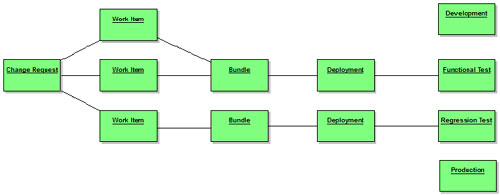
In the illustration, the linkage from the change order to the various Locations is through the Work Items. This is deliberate, and reflects the fact that the change order objects do not correspond directly with changes to software. Instead, they indicate the need or permission for changes, and the requirement to test those changes. Changes to the software are directly associated with the lower-level work item records. This way, if the initial work done is not sufficient to effect a change, then a second (third, etc.) work item can be added to the change order until the requirement is satisfied.
One interpretation of the two sets of bundle and deployment records in the illustration above might be deployments in two different technology domains. (LDM discourages this: bundle and deployment operations should be technology-agnostic if possible.) A different interpretation is that the bottom line of blocks (Work Item through Regression Test) might be an early set of changes. Possibly this early set of changes appeared to address the change order, but testing on the Regression Test server showed some problems. Two new Work Items were created, bundled together, and have been deployed as far as the Functional Test server.
Keep in mind that there will still be metadata items in the system: LDM does not eliminate the change order life cycle. What changes is that the states that correspond specifically to places in a development process are eliminated in favor of a simpler, more abstract set of metadata. In development terms, this is a refactoring of the development change request life cycle, and of the development process.
ITIL CM vs. Traditional Software CM
Traditional software CM is based on tracking versions of files. This version-centric focus colors nearly all discussions of software CM in both obvious and non-obvious ways. Talking about doing CM on the contents or structure of a relational database reveals some of the obvious limitations of the file-version approach. Trying to treat a database as one or more giant files, or trying to manage a database by treating it as a composite image built from input sources (SQL files) are two common responses to the database CM challenge. Neither works.
One possibly crucial difference is in the basic representation. File-versions are worked on until they are considered acceptable in toto. A developer changes the entire file, and generally has some desired end configuration in mind. In contrast, a database is changed by executing statements. The changes that a developer makes are made not by modifying the entire database, but by delivering a set of executable statements that perform the desired change. Thus, while a CM tool (or a developer) may use a differencing tool to compute the delta between the old and new versions of a file, in a database system the executable statements delivered are the delta between the old and new versions.
Actually using the versions of a file generally requires performing some kind of update to a work area-a location in a computer system where the files being used are projected in order to permit the development team to edit, compile, or test them. The act of updating a work area to reflect a new configuration of files and version is remarkably similar to updating a database. In fact, most CM tools emit a running commentary about what actions are being taken that looks remarkably like SQL: "creating directory X; updating file Y with version V; deleting file Z." By expressing CM in terms of the operations on work areas, LDM takes advantage of these similarities with databases to support both work-area based development (files) and database development.
A non-obvious shortcoming of the version-centric approach is the idea of encoding quality (or ‘status') in the file-version's life cycle. If a file has discrete versions, then those versions can be configured or selected independently. It should be possible to determine the acceptability of a file-version either alone or in the context of a set of associated file-versions. It follows, then, that as a file-version passes a series of tests, the quality or status of the file-version is known to be higher and higher. This ladder of perceived quality is encoded into a life cycle that is applied to each file-version.
The idea of a discretely tunable configuration is insupportable in a general-purpose database system. The order-dependent nature of database changes makes discretely tuning database content or structure impossible except in limited, rare circumstances. In fact, the notion of independently selectable versions of files is pretty thoroughly discredited in "standard" CM circles, too. Nearly all vendors, and a healthy cross-section of open-source tools, offer some mechanism for bundling sets of related file versions. Whether they are called ‘tasks' or ‘change packages,' the idea is the same: that a group of file changes belongs together. Most modern software systems require this kind of treatment because an individual file-version cannot be added or removed independently-the build or an immediate functional test will fail if the related changes to other files in the system are not also added or removed.
LDM is rooted in database-heavy development. Changes to the database are incremental, and omitting or reordering the changes is frequently impossible. Because of this, LDM focuses on the reality of delivering compatible changes, in order, to a finite set of target locations: database servers. This makes the LDM technique both a server CM technique and a software CM technique: instead of trying to separate "developing releases" and "deploying released software," LDM merges the two. Thus, some parts of LDM are focused on "software configuration management" (updates to files) and other parts focus on "server configuration management" (installation of software).
The ITIL CM approach is concerned with tracking (via CMDB) the software and hardware configuration of individual servers and workstations. This approach treats servers in much the same way that other complex hardware systems, such as aircraft or ships, are treated. There are two basic operations that can be performed against the target: incremental updates and radical changes. Generally, a radical change is anything that invalidates the tracking of incremental updates, such as reformatting a server's hard drive and installing an operating system image. (If the image installed is from a recent backup, the change may be considered the invalidation or removal of the last ‘N' updates. If the image installed is from a distribution CD, it is generally easier to mark all the updates as invalidated and start again from scratch.)
Locations, of course, correspond fairly exactly to server environments. LDM is a merger of traditional release-oriented software CM with ITIL server-oriented CM. The ITIL Service Desk model doesn't know about work items and bundling because it focuses on pre-existing software. Traditional software CM doesn't care about servers because it focuses on quality evaluations and release intervals.
It's worth repeating that every different server or target work area is potentially a location in the LDM view. If a software change is made by a developer and checked in to the repository, that is only an update to the status of the Work Item. Using the example development environment above, testing the change will require pulling the changes associated with the Work Item out of the repository into some kind of bundle, and then deploying that bundle to a particular location: the Functional Test server/workspace. If the testing organization decides that the change is acceptable, the same bundle will be associated with a new deployment record, this one linking the bundle to the Regression Test server/workspace. (The two "locations" might be different directories on the same server: LBCM understands about budget limitations.)
In this way, LDM is a "larger" CM technique than classical release-based approaches. Classical CM manages software development, extending usually to source code or binaries. If a database has to be controlled, a classical CM approach will be to manage the DDL, and possibly control execution of the DDL as a build step (which implicitly constrains the syntax of the DDL: if a "rebuild" occurs, the updates must be idempotent).
LDM exploits the similarity between updates to work area and updates to a database. This lets us manage not just structural (DDL) database changes, but content (DML) changes as well. Tracking at the "deployment" level, instead of the "development" level, takes us from build and release management up to build, install, upgrade, administration and integration management. The cost is a looser grip on the system. The benefits are well worth it.
Change Orders & Work Items: LBCM Vocabulary
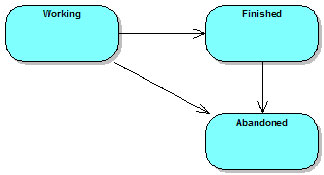
The Change order and Work Item entities are a basic implementation of the Task-Level Commit pattern. Work items have a very simple life cycle that consists of two main states: working and finished. These issues can be tied to other archiving systems as appropriate: see below. Once a work item has been finished, it can be bundled and deployed (see below) to server locations. LDM assumes that there is no going back: once a work item is deployed, it cannot be undeployed. From this it follows that once a work item is finished, it cannot be moved back to the working state: doing so would require undeploying the work item. This restriction comes from database support: once a SQL statement has been applied, there is no going back.
Work Items
A Work Item is not a software artifact. It is not a file, not an SQL statement, not a library or executable. A work item is a database entity that exists in the same issue tracking system that contains the change order records, as well as in the CM repository that contains the actual software being modified. A ‘work item' is an issue, a task, a change package, a change set.
Whatever concept your tool uses to bundle together changes to multiple software components (files, directories, tables, etc.)-that is a work item. If your tool provides a special built-in entity for this purpose-and most advanced commercial CM tools do-you may have to create a more general work item type using the life cycle editor because the special entities are frequently limited as to what customizations you can perform. Moreover, if you have to combine two or more commercial tools it is probably best to pick one "top" tool and then integrate that tool with the others.
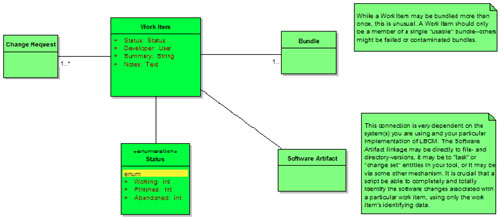
Because work items are the lowest-level entity in the software change process, the amount of metadata associated with each individual work item should be minimized. In our initial LBCM implementation, work items have very few user-specified attributes.
There are no loops in the life cycle: a work item begins in the Working state, and transitions to either Finished or Abandoned. A Finished work item that is not a part of a usable bundle (either no bundle, or a bundle marked as being invalid) may be transitioned to Abandoned. Work items are very simple, very straightforward entities.
Change orders
Change orders are more complex, and the change order life cycle includes the develop/test/fail loop that the work item life cycle does not. Change orders are what most people think of when they think about doing CM: a document detailing the specifics of the change, traceable from the time it is submitted until it is delivered to the customer. A change order corresponds to a defect or enhancement request, and so each change order implicitly has a test case of some sort associated with it. This test case(s) decides when a change order is satisfied and can be considered delivered. If a developer completes a work item associated with a change order, and the work item is not sufficient to pass the tests for that change order, then the work item remains closed (and deployed on whatever servers it is deployed to), a new work item is added to the change order and additional work performed.
When a change order involved more than one technology in our implementation, we broke it down into at least one separate work item per technology. This was not a requirement of LDM, but was an artifact of the organizational structure at work: Cobol people were different from Java people. (Recall that a work item is usually developed by a single person.) LDM work items will be capable of spanning technologies if your scripting and abstraction permit it. But creating multiple work items is relatively cheap, and also quite likely to be compatible with your political boundaries.
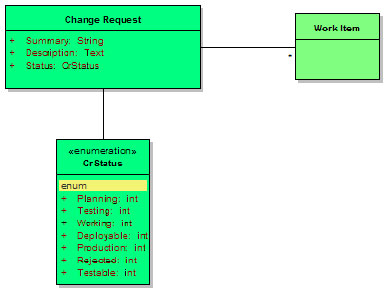
Because thechange order is where most of the work flow modeling occurs, that is where most of the data is going to be collected. The illustration shows only a few fields because any attempt at an exhaustive list would be pointless: every organization tends to have its own set of change order fields: sign-offs, impact, root cause analysis, etc. Suffice it to say that change orders will likely have more user-supplied attributes than all the other entity classes combined.
It is worth emphasizing that the change order objects and the back end objects are completely disconnected from each other. The only point they have in common is that both sides link to work items. However, the connection from a change order to its work items has nothing at all to do with the connection from work items to back end bundle objects. The back end objects are used to track the movement of software updates (work items) to different locations. Eventually, the status of the change orders will be computed by following the links from change order to work item through the back end to locations. But none of the basic LDM operations use change orders in any way.
The change order life cycle includes at least one loop: the "test loop." This cycle permits a change order to be developed, tested, fail the test, and return to development. This is the only loop required by LDM: other entities can have cycle-free work flows.
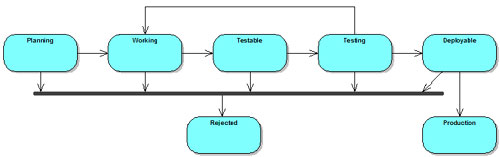
The abstracted work flow used by the LDM change order entities plus the very simple work item life cycle permit merging many CM functions under the umbrella of LDM. Different tools, different technologies, even different development processes (though basically similar) can be combined under a general-purpose work flow. Negotiating the details of this may be a significant challenge, especially if one or more component organization or team is under regulatory constraints.
In particular, our implementation supported different technologies (Cobol, Java, .NET, Oracle) used by different teams with very different development processes. Our team was geographically distributed as well: different development groups (even groups using the same technology) were in distant locations. The one strength of the enterprise was that nearly all of the teams were familiar with the development methods used by other teams, so a consensus vocabulary was very easy to develop. Naturally, a common work flow followed easily from that.
Example
Consider the following example of development under LDM. In this example, a change order requires both Cobol and Java changes. In the first part of the example, the development team (or engineering management) breaks the change order into separate work items: one for the Java change, and one for the Cobol change. This kind of situation might arise if an external system (such as a credit bureau) added functionality or data to the interface. The Cobol program responsible for interfacing with the external system would have to be updated, and the Java program that made use of the interface would then be modified to handle (or ignore) the additional communications parameters.
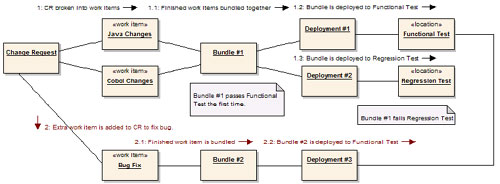
After the two work items are finished, the change order is moved from the "Working" to the "Testable" state. Then the changes associated with the work items are bundled and deployed, and the change order moves to the "Testing" state. The eventual result of testing is that the two work items for "Java Changes" and "Cobol Changes" are deployed to the Regression Testing location where they fail: a bug is found.
When the change order fails Regression Testing, a nasty entry is added to the change order data by the testing team and the change order is moved back to the "Working" state. The two test areas still contain the changes associated with the bundled and deployed work items. In order to deliver a fix to the regression bug, a new work item is created. This item is quickly finished, and once again the change order enters the "Testable" state. The new work item is bundled and deployed to the Functional Test area, the change order is moved to the "Testing" state, and we wait for more test results.
Eventually, when the change order passes through the testing process successfully, the QA team will move the change order into the "Deployable" state. This state means that testing is complete, but the change order has not necessarily been deployed to production (or released, or whatever). When bundles that include every single work item have been deployed to production, or incorporated into the release image, the change order can be moved into the Production state.
Bundles, Deployments, Locations: LBCM Vocabulary
Change orders and work items are the front end of the LBCM technique, and hopefully the implementation of those types is straightforward and comprehensible. The back end is where the unusual parts of the LDM technique live, in types representing Bundles, Deployments, and Locations.
Bundles
Bundles encapsulate the selection and extraction of changes into a portable format. A bundle's content is specified by linking it to work items, and the eventual bundling process collects all the changes from the linked work items, resolves any conflicts (such as different versions of the same file) and packages the resulting set of updates in a format usable by the deployment process.
The actual bundle format does not have to explicitly include the changes themselves. In our initial implementation, we explicitly included only those items that had a separate, explicit packaging procedure-SQL updates exported from the Oracle database. Changes to files, such as Forms and Java files, were ignored-the deployment process could trace from the bundle to the work items to the MKS change packages to the file versions.
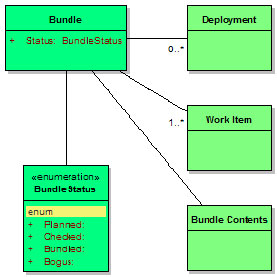
Bundles include little field data beyond their status. The most important data in the bundle are the links to the included work items, and to the bundle contents. In our implementation we used a separate bundle identifier (not the integer provided by MKS) because the client had a complex alphanumeric standard for bundle identifiers. The process of exporting the bundle contents produced a whole set of files, but we used a specially created MKS change package to link the bundle to all of the generated files. Even with the link to the generated files and the specially-formatted identifier field, there is still very little attribute data on the individual bundle objects.
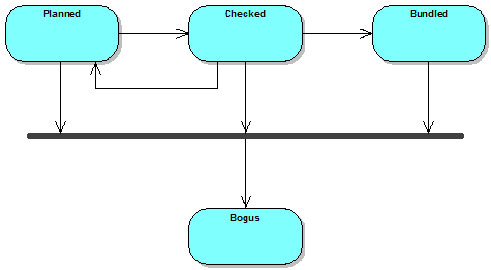
The bundle life cycle contains two preparation steps, Planned and Checked, instead of one. This is to support an automated rules checker we used during our implementation. There were constraints on the types of work items that could be bundled together, and this extra step was inserted so that the rules checker could be invoked by the issue tracking tool (MKS), modify the contents of the bundle, and the results could be presented in the GUI. Had the rules checker been strictly a pass/fail operation, the extra state would not have been needed: failure would have aborted the state transition. But with the possibility of mechanically updating the contents of the bundle, we felt the extra state was a better solution.
A bundle is prepared in the Planned state, and the user requesting the bundle is not expected to be entirely aware of all the rules for bundling. In at least one case, the rules continued to change some time after the initial roll-out, as the capabilities of other tools evolved. The naïvely prepared bundle is usually generated by a query against work items for a particular target (product) that are Finished but not part of any bundle. (In fact, because we had a Bundled state for work items, the query was just for work items in the Finished state.)
This list of work items is linked en masse to the newly created bundle. Then the bundle is transitioned to the Checked state. This transition invokes the bundle checker, and several sets of rules are applied. The bundle rules were created to address problems with the deployment sequencing of bundles. The abstraction of the underlying technologies is sufficient to deal with most of the deployment differences: bundling Java and Metadata and Forms and Cobol is possible, so long as there are no sequence issues.
Sequencing becomes a problem because LDM treats the bundles as black boxes. The only way to get a software change in a particular location is to deploy the bundle that contains the work item(s) that deliver the change. A corollary to this is that if two separate changes, or two distinct parts of the same change, need to be delivered separately, they must be part of two separate bundles.
As a case in point, consider a "global" change. (For example, a change to a common library of javascript code used by all products.) If a change to this common library is made in association with product ‘A,' then the change might be bundled together with other product-specific changes. If, subsequently, developers of product ‘B' make changes that depend on the functionality added to the common library, then the deployment of ‘B' depends on the ‘A' bundle containing the common library changes. But if the deployment of ‘A' is delayed for any reason, there is the real risk that the ‘B' updates will be deployed to an environment that cannot support them.
In a high-volume development environment (which we had) this can arise astonishingly often. We saw these vulnerabilities almost on a monthly schedule. Our solution was to carefully define the notion of core product changes, and manage those changes separately.Making a core change required creating a separate work item, andthose work items required a separate bundle. This caution is not an inherent limit or feature of LDM -rather, it reflects LDM operating at a higher level of abstraction than traditional techniques. We found ourselves dealing with synchronization of development and delivery of changes across products, across technologies, and sometimes across locations.
This is an enterprise kind of problem, and one that causes a fair number of headaches in a traditional CM environment. Because of the higher abstraction level, LDM can solve the problem with just an extra lifecycle state and some automation. This also reflects a brutal truth about enterprise CM: ideally, a bundle is a pure, abstract object that collects any arbitrary group of work items together and makes them available for deployment. In practice, there are lots of ways that work items can be incompatible with each other. We abstracted the bundling and deployment operations until the incompatibilities were compatible with our development environment, and declared victory.
From the Checked state, bundles can retreat back to their starting point if the contents are found to be horribly wrong. Or a bundle can proceed to the Bundled state. This transition was created specifically to support automated bundle generation. The checking and reorganization (including creating extra bundles, if needed) is handled during the transition to Checked, then the actual extraction and packaging takes place en route to Bundled.
The bundling process is one of the ‘magic' abstracted operations in LDM. A bundle has to contain enough data to be able to deliver its changes. But copying file-versions may or may not always work (especially if complex conflict-resolution rules are in place for parallel versions) and storing or archiving files is usually going to be redundant. In general, designing the bundling process is a trade-off between efficiency and redundancy. The decisions you make are going to constrain your operating environment in some interesting ways.
In our implementation, the bundling process for our Oracle-based Metadata system invoked a special process to convert changes in the system into files containing SQL code. The SQL was generated especially for the bundle, and so these files were checked in to the CM tool as an MKS change package linked to the bundle. The Java and Forms code, however, were developed using traditional file-based techniques. Because a work item for Java or Forms changes automatically had a link to the file-versions that were created by the change, the bundle did not duplicate any of this data. Instead, the deployment operation was left to follow the links to extract the file-versions in question. The same design choice could be valid for any file-based development approach: .NET, C++, etc.
This design committed us to a source-code based approach to bundling and deployment. Any deployment operation has to include a compilation step for the source code. That gave us flexibility, at the cost of frequent builds. If this is too expensive, an alternative might be to compile the impacted components as part of the bundling operation, then deploy the compiled objects. This has some pretty obvious drawbacks, and tends to impose a linear code flow on the entire system. But if the components being developed are granular, and the internal architecture of the components can handle the occasional conflict produced by weird configurations, it could probably be made to work.
In the event a bundle is found to be completely unusable, the lifecycle includes the Bogus state. This is a catch-all transition which we found wasn't used very much (thankfully!). But there are always one or two things that get FUBAR, and planning for them doesn't cost much.
Deployments
A Deployment is an electronic record of the details surrounding the delivery of the changes associated with a collection of bundles to a target location.
Like a bundle, a deployment's primary data is in the form of links to related items. Where a bundle is composed of work items, a deployment is composed of bundles. There are two sets of data intrinsic to the Deployment type. The first is the basic data common to every deployment. This will typically include the time and date, the identification of who requested and who performed the deployment, etc. The second set of data is any extra data associated with complex work flow logic restricting the deployments.
In our implementation, we actually had two "merged" life cycles for the deployment type. One was the simple flow shown here. The second was a complex life cycle that included "qualitative" states for our "staging" and "production" locations, and that required deployments to staging to precede deployments to production. This complexity was a political compromise, and within a few months we had cases where the strict deployment order was not always followed. In retrospect, it would have been better to omit the dual life cycles and implement the prerequisite deployments as a link to an earlier deployment object.
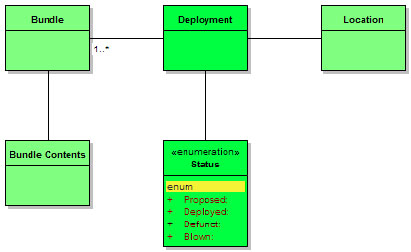
Transition from the Planned to the Deployed state represents the successful execution of the deployment process across however-many technologies are part of the target location. In general, if a location cannot support a technology implied by a bundle or work item, that technology should be ignored. This does not mean that requesting deployment of an invalid bundle is not an error-if deployments are being scheduled by build or release management personnel, those personnel should be sufficiently aware of the technologies involved in the bundles.
The Proposed - Deployed transition is the trigger for the scripts that support the automated process. One of the technical challenges of implementing LDM is comprehending, in a script, the timing and dependencies that are required by the bundles associated with a deployment. Computing the dependencies for a single technology is frequently challenging. Doing so across technology boundaries is usually simpler, because the set of possible dependency types is limited. Detecting, comprehending, and resolving the ordering requirements within a deployment is an area that benefits from help provided as extra data fields, bundling rules, and other factors ‘external' to the basic LDM work flows.
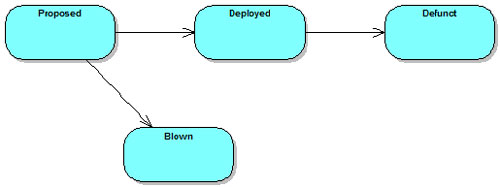
Another check to perform during the transition from Proposed to Deployed is validation of the transition itself. Mechanically, a deployment must have at least one bundle associated, and must have a target Location. Beyond these rules, you may wish to check the contents of the deployment against the location (to avoid trying to deploy Cobol changes to a Java server) or to check the identity of the user requesting the deployment against the contents. Requiring that only Cobol release managers deploy Cobol changes, or that only they can deploy to Cobol locations, makes sense in some organizations. A more obvious governance benefit comes from requiring that only members of a Production Control team can deploy to production servers.
As mentioned previously, the initial LDM implementation featured an Oracle metadata system that exported the changes associated with work items as files of SQL statements. The deployment process for these command files should be pretty obvious: take the server off line, run the SQL, put the server back on line.
The process for Java changes was a little more complex. As discussed, we implemented LDM on top of MKS Integrity 2006. The MKS Source Integrity component had no trouble performing work area updates using change packages. The design for Java deployments calls for maintaining a separate workspace for each target location. The deployment process invokes the MKS tool chain to ensure the work items are part of the configuration for the workspace, then rebuilds the source.
Once a deployment is successfully completed, it will sit in the Deployed state until it becomes irrelevant to the target location. This will happen when the server itself becomes inactive, or when the server's content is reset to some zero point: a hard drive is reformatted, the software is uninstalled, etc.
When a deployment fails, it usually indicates some kind of problem with the abstraction and/or automation elements of the system. In most cases, this means leaving the deployment record in the Proposed state until the automation scripts are fixed. In cases where the situation is dire, a Blown deployment can be recorded. This can happen if the problem lies with the content of the deployment rather than the scripts responsible for deploying, or if recording that the problem occurred is important.
Locations
A Location is a proxy record in the system that acts as a placeholder for a server or workspace. Locations will never have very much data-just enough to name and identify the location in question. How complex this data is depends on the environment: the technologies in use will dictate what data needs to be recorded. (Port numbers, passwords, etc.)
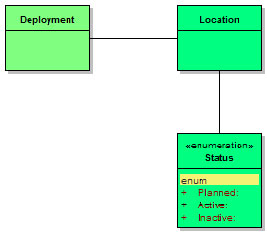
Locations, and the location life cycle, are directly inspired by the ITIL CM model. A hardware CI (server) in the ITIL model will generally have a more complex lifecycle than a location does, and the data associated with locations is very specific to the technology used in the development environment. In a purer refactoring, location would probably be split into two classes: the server itself, which might correspond directly to the ITIL representation, and a Technology Deployment record that contained the details needed for deploying a single technology to that particular server. The initial implementation was simple enough that there was no obvious need for this. In retrospect, however, creating the extra classes offers enough benefit, especially for the long term, that this will become part of the LDM repertoire.
The Planned lifecycle state exists to pre-allocate resources for a server. As you might suspect, the initial implementation involved buying new hardware. We had to have a state reflecting that we planned to have hardware, but it had not yet arrived. Beyond this, Active is the primary state. It is used for locations that are up and running and accessible. Locations will be in this state for most of their lives.
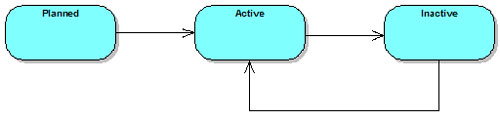
If a location is unavailable for a significant length of time, it can be moved to the Inactive state. This isn't intended for tracking server restarts, but rather long-term or permanent inactivity. A location should be marked Inactive if it is down pending arrival of new parts, or if the server software is removed, or if the machine is repurposed with a new OS.
Example
Let us revisit the example of development with LDM. This is the same scenario (and the same diagram) as previously: a change order requires both Cobol and Java changes. In the first part of the example, the change order is decomposed into two work items. After the work items are finished, they are bundled, deployed, and a bug is eventually discovered. The bug fix is developed as a third work item, bundled and deployed separately.
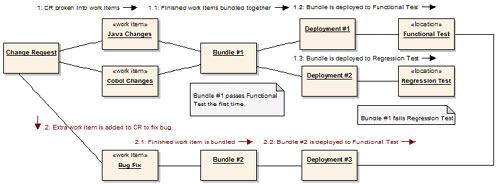
What should be clear now is the way that the bundle, deployment, and location entities collaborate in the system. The work items are the ‘key' for pulling software changes from the underlying CM tool(s). Finished work items are grouped together in bundles using some common factor. In the implementation, we used two different grouping strategies. Usually, QA requested groups of changes by time: "All work items for product X finished as of Tuesday." Sometimes, however, the grouping was specific to a product function or to a particular change order. The only potential "gotcha" is that regardless how you approach grouping work items for bundling, all (or nearly all) of the bundles have to eventually be delivered. Moreover, the process works best when the changes are delivered roughly in the same order they were made.
After work items are bundled together, that bundle becomes the definitive way to get those changes to any target location. Work items should never be part of two different active bundles. (It's okay for a work item to be part of a Bogus bundle. That bundle might as well not exist, and it can't come back from that state.) The bundles, especially any generated data, are artifacts that must be kept. They are not artifacts of the build process, but rather artifacts of the CM process. In our implementation, file-based development like Forms and Java produce no artifacts beyond the files themselves. The Oracle metadata development, though, generates SQL files that must be archived. In order to be able to deploy the changes in the bundle, the SQL files have to be retrieved.
The bundling process serves as a buffer between the basic version control tasks subsumed in the work items, and the build-release-install-deploy operations that are encapsulated in the deployment step. After bundling, deployment takes the bundle data plus any associated artifacts as input, and causes one particular location to be updated to contain the changes linked to or stored in the bundle.
This is an important point, and a frequent source of confusion: there is no "qualitative" work flow built in to the bundle or deployment objects, nor part of the location objects. Instead, that part of the traditional CM work flow is externally represented by the sequence of deployments the team uses. If there are servers that are supposed to be deployed in a particular order, LDM does not enforce the order. Instead, LDM supports deployments in pretty much any order, but rigorously reports the exact order that occurred. It is possible to implement checks on the deployment order, or reporting on ‘strange' deployment orders. But it is not a requirement. LDM understands about fixes that get rushed into production first, and tested later.
Each time that a bundle or group of bundles is deployed to a location, a new deployment record is created. This is the corollary to the "no lifecycle" rule above: each deployment is a separate, independent transaction. If two deployments occur, two deployment records will exist. This insistence on maintaining a direct correlation with the real world helps to keep the LDM system accurate. This accuracy enables building more elaborate systems on top of LDM.
Implementation Notes
As mentioned, we implemented LDM on MKS Integrity 2006. The life cycle editor was used to create all the issue types discussed above, plus some higher-level types that were business-specific. All of the types were implemented in the Integrity Manager: the Work Item types were linked to the various change package types, and also to change tracking records built in to the Oracle-based Metadata system we were using. Using a single repository for the issue types simplified a lot of design issues.
Conventional source code, like COBOL and Java, was managed using Implementer or Source Integrity. The code was organized in whatever fashion was appropriate to the development team. LDM built on top of the source code control tools.
Work items corresponded to MKS change packages when making source code changes. A work item corresponded to a metadata SCR when making metadata changes in the database. The bundling operation for source code simply recorded the change packages being bundled. Bundling of metadata changes required exporting the changes associated with the SCR as a set of SQL statements.
Deploying the source code work items required maintaining a separate workspace for each location. The bundles being deployed would be scanned for links to change packages, and then the workspace would be updated with the contents of the change packages. Once the update was complete, the workspace was rebuilt, and the built products were installed. Deploying the metadata work items was considerably easier: the SQL statements generated as part of the bundling operation were applied to the database at the target location.
Status accounting for the system is generally based on the change orders. Status for a change order is computed by following links in the database from the change order to its component work items, then from the work items to any bundles, from bundles to deployment records, then to locations. The team devised rules for interpreting mixed deployment status. If a change order had two work items, one deployed to development and the other deployed to testing, then the order was "partially in testing."
Because of the extra record types, we could provide more complete data about change orders. In particular, our status reports also included the current status of each server platform (location.) We could not only report that a change order was closed, but that it had been deployed to the QA server since July 17th. This increased the transparency of the development process. Management could effortlessly look beyond change orders all the way to the individual hardware platforms. Not only does LDM solve the Enterprise CM and Database CM issues, but it provides a detailed, accurate, up-to-date picture of the system.